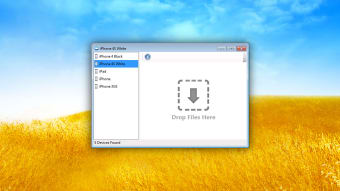
If you need to send large files from your PC to other PCs, tablets, smartphones and Macs connected to the same network via WiFi, then File Transfer is a handy tool. File Transfer is easy enough for anyone to use - no configuration is needed and it doesn't use the Coud or Bluetooth. It simply detects devices on your network. Note that you must enable the Receive Files mode on the target device to accept files otherwise you won't be able to start transfers.
With decades of experience in IT management and later as a writer and tutor, she combines technical knowledge with a passion for clear communication. His work spans editing, teaching, and writing, bringing authority and precision to content on technology and related fields.
Pros
Great if devices are connected to the same network
The easiest, fastest way to send and receive files from your Macs, PCs, iPhones, iPads, and iPod Touches. It is quick and easy. No configuration required, no need to enter an address to connect. Devices are automatically discovered. Drag files and they are transferred to your device in seconds. Without iTunes and without USB cable.
File Transfer is the professional version of the free app File Storage Companion. Compared to it, File Transfer: • Allows you to quickly share files also between your Macs and PCs.To send and receive files from iPhones/iPads/iPod Touches, File Transfer requires File Storage to be installed on your device. Available on the App Store.
It is not a cloud. Files are transferred directly on your local network. No need to upload your files to the Internet, then download them on any device.
For home and professional users, it is quick and easy. No configuration required, no need to enter an address to connect. Devices are automatically discovered. Drag files and they are transferred to your device in seconds.
Laws concerning the use of this software vary from country to country. We do not encourage or condone the use of this program if it is in violation of these laws. Softonic may receive a referral fee if you click or buy any of the products featured here.